For Validators
BAM (Block Assembly Marketplace) connects supported validator clients to an external scheduler over gRPC. The BAM Node sends pre-sequenced transaction and bundles, executing them in FIFO order with respect to account locks. This design maintains network security while enabling sophisticated transaction ordering strategies.
Access to BAM is fully permissionless, and any validator can join mainnet or testnet by following the instructions below.
Quick Start Guide
Read the Common Configuration Reference before starting either path. It covers the BAM Node endpoints, the on-chain addresses, and the leader-schedule requirement, all of which apply to Jito-Solana (AgaveBAM) and FireBAM alike.
Understanding the Architecture also applies to both paths, as do the Operational Modes, Security & Audits, and Support sections at the end.
Then choose the setup path for your validator client and follow its numbered steps:
- Setup Path 1: Jito-Solana — for validators running the Agave-based Jito-Solana client
- Setup Path 2: FireBAM — for validators running Firedancer or Frankendancer
Understanding the Architecture
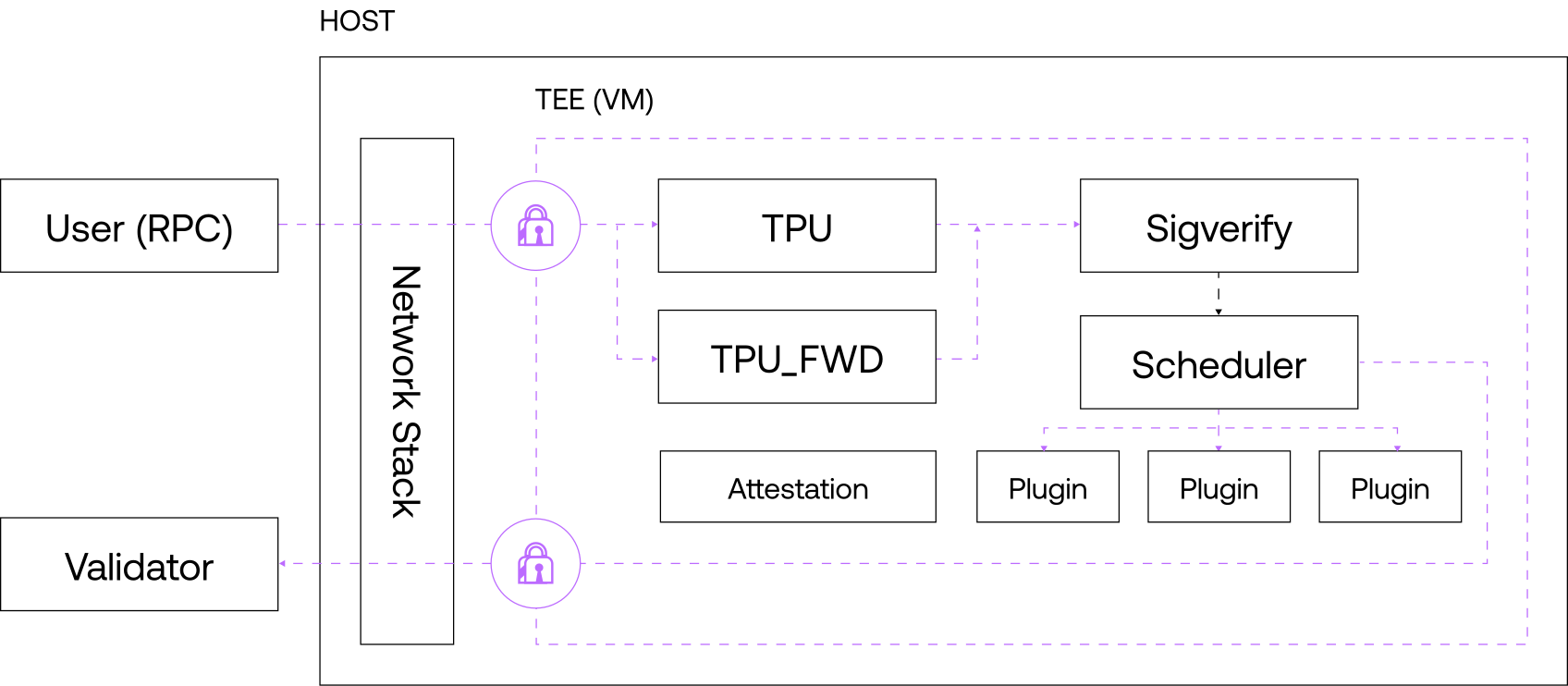
The BAM system operates within a Trusted Execution Environment (TEE), providing secure transaction scheduling while maintaining validator sovereignty over block production. This applies to both setup paths below.
Common Configuration Reference
These three topics apply to both setup paths. Read them before following either one.
Choose Your Region
Connect to the BAM Node closest to your validator. Both setup paths use these endpoints: Jito-Solana passes one to --bam-url, and FireBAM points its bam tile at the same host with port 50055.
Use these global URLs for automatic routing to the nearest BAM scheduler.
| Network | BAM URL |
|---|---|
| Mainnet | http://mainnet.bam.jito.wtf |
| Testnet | http://testnet.bam.jito.wtf |
Pin your connection to a specific city if you need precise locality or want to benchmark individual schedulers.
| Network | Region | BAM URL |
|---|---|---|
| Mainnet | 🇳🇱 Amsterdam | http://ams.mainnet.bam.jito.wtf |
| Mainnet | 🇺🇸 Ashburn | http://iad.mainnet.bam.jito.wtf |
| Mainnet | 🇺🇸 Dallas | http://dfw.mainnet.bam.jito.wtf |
| Mainnet | 🇮🇪 Dublin | http://dub.mainnet.bam.jito.wtf |
| Mainnet | 🇩🇪 Frankfurt | http://fra.mainnet.bam.jito.wtf |
| Mainnet | 🇭🇰 Hong Kong | http://hkg.mainnet.bam.jito.wtf |
| Mainnet | 🇬🇧 London | http://lon.mainnet.bam.jito.wtf |
| Mainnet | 🇺🇸 Los Angeles | http://lax.mainnet.bam.jito.wtf |
| Mainnet | 🇺🇸 New York | http://ewr.mainnet.bam.jito.wtf |
| Mainnet | 🇺🇸 Pittsburgh | http://pit.mainnet.bam.jito.wtf |
| Mainnet | 🇺🇸 Salt Lake City | http://slc.mainnet.bam.jito.wtf |
| Mainnet | 🇺🇸 Seattle | http://sea.mainnet.bam.jito.wtf |
| Mainnet | 🇱🇹 Šiauliai | http://sqq.mainnet.bam.jito.wtf |
| Mainnet | 🇸🇬 Singapore | http://sin.mainnet.bam.jito.wtf |
| Mainnet | 🇯🇵 Tokyo | http://tyo.mainnet.bam.jito.wtf |
| Testnet | 🇺🇸 Dallas | http://dfw.testnet.bam.jito.wtf |
| Testnet | 🇩🇪 Frankfurt | http://fra.testnet.bam.jito.wtf |
| Testnet | 🇺🇸 New York | http://ewr.testnet.bam.jito.wtf |
| Testnet | 🇺🇸 Salt Lake City | http://slc.testnet.bam.jito.wtf |
| Testnet | 🇺🇸 Seattle | http://sea.testnet.bam.jito.wtf |
Reference Addresses
Both paths configure the same tip programs and Block Engine endpoint — Jito-Solana through CLI flags, FireBAM through [tiles.bundle] in its config file.
Leader Schedule Requirement
Your validator needs to be in the leader schedule in order to connect to BAM. BAM will only establish connections with validators that have upcoming leader slots.
Setup Path 1: Jito-Solana (Agave)
Step 1: Install the Jito-Solana Client
The BAM client is integrated into supported Jito-Solana releases as an opt-in feature.
- Building the Jito Client - Instructions for installing and building the Jito-Solana client
Step 2: Configure Your Validator
Running the BAM validator client is similar to running Jito-Solana, but requires one configuration addition:
# Required BAM configuration flag
--bam-url <BAM_NODE_URL>                    # Connect to BAM scheduler

# Additional important flags for Block Engine integration
--shred-receiver-address <ADDRESS>          # Shred receiver address, described in https://docs.jito.wtf/lowlatencytxnsend/#api
--block-engine-url <BLOCK_ENGINE_URL>       # Block engine endpoint, described in https://docs.jito.wtf/lowlatencytxnsend/#api
Testnet Example
agave-validator \
  --identity /path/to/validator-keypair.json \
  --vote-account /path/to/vote-account-keypair.json \
  --ledger /path/to/ledger \
  --bam-url http://testnet.bam.jito.wtf \
  --shred-receiver-address shredstream.testnet.block-engine.jito.wtf:1002 \
  --block-engine-url https://testnet.block-engine.jito.wtf \
  --rpc-port 8899 \
  --tip-payment-program-pubkey GJHtFqM9agxPmkeKjHny6qiRKrXZALvvFGiKf11QE7hy \
  --tip-distribution-program-pubkey DzvGET57TAgEDxvm3ERUM4GNcsAJdqjDLCne9sdfY4wf \
  --merkle-root-upload-authority 7T4inmPmtNBX3MhLwJ9hFsSMnGJYYkKioVABSNTWVRuS \
  --commission-bps 800 \
  # ... your other testnet configuration
Mainnet Example
agave-validator \
  --identity /path/to/validator-keypair.json \
  --vote-account /path/to/vote-account-keypair.json \
  --ledger /path/to/ledger \
  --bam-url http://mainnet.bam.jito.wtf \
  --shred-receiver-address shredstream.mainnet.block-engine.jito.wtf:1002 \
  --block-engine-url https://mainnet.block-engine.jito.wtf \
  --rpc-port 8899 \
  --tip-payment-program-pubkey T1pyyaTNZsKv2WcRAB8oVnk93mLJw2XzjtVYqCsaHqt \
  --tip-distribution-program-pubkey 4R3gSG8BpU4t19KYj8CfnbtRpnT8gtk4dvTHxVRwc2r7 \
  --merkle-root-upload-authority 8F4jGUmxF36vQ6yabnsxX6AQVXdKBhs8kGSUuRKSg8Xt \
  --commission-bps 800 \
  # ... your other mainnet configuration
Step 3: Enabling Metrics Collection (Recommended)
To enable metrics collection for your BAM validator, export the following environment variable:
Testnet
export SOLANA_METRICS_CONFIG="host=https://metrics.solana.com:8086,db=tds,u=testnet_write,p=c4fa841aa918bf8274e3e2a44d77568d9861b3ea"
Mainnet
export SOLANA_METRICS_CONFIG="host=https://metrics.solana.com:8086,db=mainnet-beta,u=mainnet-beta_write,p=password"
Step 4: Runtime Configuration (Optional)
You can enable, update, or disable the BAM configuration during runtime using the agave-validator CLI tool without restarting your validator.
Enable or Update BAM URL
agave-validator --ledger <DIR> set-bam-config --bam-url <bam_url>
Example:
agave-validator --ledger /path/to/ledger set-bam-config --bam-url http://$NETWORK.bam.jito.wtf
Disable BAM
# Disable BAM (leave --bam-url empty)
agave-validator --ledger <DIR> set-bam-config --bam-url
Example:
agave-validator --ledger /path/to/ledger set-bam-config --bam-url
Setup Path 2: FireBAM (Firedancer / Frankendancer)
FireBAM is a fork of Firedancer that adds BAM support for Firedancer and Frankendancer validators. The steps below cover the minimum FireBAM-specific setup. For host requirements, complete configuration, monitoring, and recovery procedures, see the full FireBAM setup guide.
Alpenglow Migration (Epoch 1064)
Alpenglow activates at epoch 1064. The epoch rollover is estimated for October 21, 2026 at 13:44 UTC (09:44 EDT / 06:44 PDT), plus or minus 10 minutes. Activation takes up to 5,000 slots, and the cluster is fully migrated at slot 5,001.
Before activation:
- Switch to a Jito-Solana v4.3.2 node today (see Setup Path 1) as soon as possible, so that your node is ready and healthy.
- Be present for the rollover in case anything needs operator attention.
After activation:
- Run a FireBAM release based on Firedancer v26.10.3 or later. It contains important reliability and performance improvements for Alpenglow.
- You may switch back to FireBAM any time after the migration completes and the cluster looks stable. Watch the cluster delinquency rate when failing back.
- Retrieve an incremental snapshot at slot 5,002 or later. A node that loads an earlier snapshot will not start.
- Validator configuration changes in Alpenglow. Enable it with either the
--alpenglowflag or[consensus] alpenglow = truein your configuration file, both when you rerunconfigure init(required before bringing up the node) and when you start the node. - Alpenglow replaces
tower.binwithvote_history-<X>.bin. Please see Manual failover with Alpenglow.
Step 1: Build FireBAM
Select the intended release, then clone and prepare the repository:
git clone --recurse-submodules https://github.com/jito-foundation/firebam.git
cd firebam
git checkout RELEASE_TAG
git submodule update --init --recursive
./deps.sh
Build only the binary for your validator mode:
# Firedancer
make -j firedancer

# Frankendancer
make -j fdctl
Use firedancer for Firedancer or fdctl for Frankendancer. The binaries are
written to build/native/gcc/bin/.
Step 2: Configure FireBAM
Start with your existing reviewed validator configuration and use the checked-in BAM configuration for your cluster and validator mode as a reference:
[tiles.bundle].enabled = true must be present at startup before bundle functionality can be used.
[tiles.bam].enabled = true must be present at startup before BAM functionality can be used.Step 3: Start FireBAM
Replace mainnet.toml with the exact path to your reviewed configuration and
run only the command for your validator mode:
# Firedancer
sudo -E ./build/native/gcc/bin/firedancer run --config mainnet.toml

# Frankendancer
sudo -E ./build/native/gcc/bin/fdctl run --config mainnet.toml
Run FireBAM under your validator's process supervisor. Do not start a second validator against the same identity, ledger, or accounts directories.
Step 4: Verify FireBAM
Inspect the configured topology using the applicable command:
# Firedancer
./build/native/gcc/bin/firedancer mem --config mainnet.toml | grep -E '(^|[[:space:]])(bam|bam_verif|pack_bam_(ldr|res)|bank_bam|bam_status|bam_ctrl|bam_fee_cfg)([[:space:]]|$)'

# Frankendancer
./build/native/gcc/bin/fdctl mem --config mainnet.toml | grep -E '(^|[[:space:]])(bam|bam_verif|pack_bam_(ldr|res)|bank_bam|bam_status|bam_ctrl|bam_fee_cfg)([[:space:]]|$)'
Confirm the running validator's BAM configuration:
# Firedancer
./build/native/gcc/bin/firedancer get-bam --config mainnet.toml

# Frankendancer
./build/native/gcc/bin/fdctl get-bam --config mainnet.toml
Run only the command for your validator mode. It should report the expected
enabled, url, and sni values. If HTTP metrics are enabled, check BAM
health and pack progress:
curl -s http://127.0.0.1:7999/metrics | grep -E '^(bam_|pack_bam_)'
When BAM is connected and healthy, bam_enabled, bam_healthy, and
bam_stream_live should each be 1.
Step 5: Runtime BAM Control (Optional)
The BAM endpoint and enable state can be changed without restarting only if the
validator started with [tiles.bam].enabled = true:
# Firedancer
./build/native/gcc/bin/firedancer set-bam --config mainnet.toml --enable --url http://mainnet.bam.jito.wtf:50055
./build/native/gcc/bin/firedancer set-bam --config mainnet.toml --disable

# Frankendancer
./build/native/gcc/bin/fdctl set-bam --config mainnet.toml --enable --url http://mainnet.bam.jito.wtf:50055
./build/native/gcc/bin/fdctl set-bam --config mainnet.toml --disable
Always pass the same configuration file used to start the validator. See the full FireBAM setup guide for testnet endpoints, identity changes, metric definitions, and troubleshooting.
Operational Modes
Your validator operates in one of these modes depending on your configuration:
| Mode | Description | Scheduler | Bundle/Txn Source |
|---|---|---|---|
| Normal Agave | Standard Solana validator behavior | Internal Agave Scheduler | TPU ingestion |
| Block-Engine | Jito MEV-enhanced operation | Internal with Block Engine | Jito Block Engine & TPU |
| BAM | External scheduler delegation | External BAM Scheduler | BAM Node via gRPC |
🔒 Security & Audits
Support
- Technical Questions: Discord Community